
The area on the left of a list can be used to display the lines in a hierarchical tree
display.
This is best described with an example.
- Open your Dashboard. Refer to this FAQ if you can't see it.
- Enable the Tasks For Today widget if you haven't already. Refer to this FAQ to do this.
- Make sure you have at least 2 tasks listed.
- Click the group icon (
 ) for the Status field.
You will now see the status field has moved over to the left and grouped by status.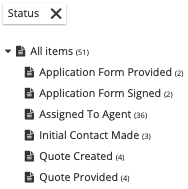
- Click on one of the status groups. Only the tasks with that status will be shown.
- Click the group icon () for the Due Date field. The Due Date field has moved over
to the left also and that grouping is also applied.
A tip:
Try clicking on the field titles that have been grouped to the left and you will
often be able to futher specify the grouping criteria. For example, clicking the
"Due Date" title allows you to group by year, month, day or hour.
To remove a grouping, simply click the cross icon on the right side of the field title
grouped on the left. This will return the field to its usual position in the list and it
will no longer be taken into account when grouping.
Comments
0 comments
Please sign in to leave a comment.